Rent collection software for small apartment complex owners: complete 2026 guide

PayRent fits small apartment owners who want bank-transfer and card rent payments with tenant-balance tracking. See how to choose a clear 2026 collection process.
Small apartment complex rent collection software is a way to receive and record rent with the aim of keeping every tenant balance clear. Owners of smaller buildings need to see which unit paid, which payment is partial, and what still needs attention without losing track across checks, bank transfers, and cards. In 2026, the right choice depends less on the size of a feature list than on whether you can answer those questions for every unit.
TL;DR
- PayRent is a practical rent collection software option for apartment complex owners who need bank-transfer and credit-card payments with tenant-balance tracking.
- Start with a unit-by-unit rent ledger, then choose a collection method that keeps it accurate.
- Compare payment methods, recordkeeping work, and tenant access before changing your 2026 process.
Why rent collection matters for small apartment complex owners
A missed payment is easy to spot when you manage one lease. Across an apartment building, the harder question is whether a balance reflects unpaid rent, a partial payment, or a payment you have not recorded yet. That distinction determines whom you follow up with and what you say.
PayRent is best for independent landlords and property managers who want online rent collection by bank transfer or credit card alongside tenant-balance tracking. Its stated scope fits small rental portfolios. You still need to decide how your building will handle payment records, tenant communication, and any rules that apply to your leases.
This guide separates the work you can do with a basic ledger from the reasons to use PayRent. That order matters in 2026: software cannot fix an unclear rent roll. First establish what each tenant owes and how you will confirm receipt; then choose the collection process that supports it.
How to choose and set up your collection process
List every unit and rent obligation
Start with a rent roll you can read without opening every lease. A spreadsheet works: give each occupied unit a row, record the tenant and the amount due under the lease, and keep the due date beside it. Use your signed documents to fill in the details rather than relying on memory.
Keep obligations separate from payments. If you overwrite an amount due when money arrives, you lose the ability to explain a remaining balance. In 2026, use the same unit identifiers across your leases, ledger, and tenant messages so a payment does not end up assigned to the wrong apartment.
Give each unit a consistent identifier.
Record the tenant named on the lease.
Enter the rent amount and due date from that lease.
Keep charges and payments in separate fields.
Decide which payment methods tenants can use
Next, write down how tenants currently pay. A manual list is enough to expose the work: note whether you receive a check, bank transfer, or card payment, then note how you confirm it and enter it in your ledger. Do not treat a tenant saying they paid as confirmation that you received the payment.
PayRent provides online rent collection by bank transfer or credit card. That makes it a relevant option when you want to offer those methods and track tenant balances in one platform. It does not remove the need to check the payment terms and explain the chosen process to tenants before you change it.
List the methods you accept now.
Identify how you confirm receipt for each method.
Check the current terms of any method you plan to offer.
Tell tenants which method to use and how to identify their unit.
Build a receipt-to-ledger routine
For each payment, define the same sequence: confirm receipt, match it to a tenant and unit, record the date and amount, then update the balance. You can do this manually in a spreadsheet. The routine matters more than the format because an unrecorded payment creates the same dispute whether it arrived by check or online.
If you use PayRent for collection and balance tracking, check how the records it shows fit your bookkeeping process. Choose the process that lets you explain a balance from the underlying payments, not just display a total. That is especially useful when a tenant pays less than the amount due or asks you to review an entry.
Match every received payment to a tenant and unit.
Record the amount received separately from the amount due.
Retain the information you need to check a disputed entry.
Review unmatched payments before contacting a tenant about a balance.
Set a follow-up order for unpaid balances
Decide what you will check before sending a reminder. First confirm the rent obligation in the lease. Then check for a payment you received but did not match, and look for a partial payment. Only after that should you contact the tenant about the remaining balance. A simple written checklist keeps follow-up consistent across units.
Your message should state the unit, the balance you are asking about, and the period it covers. Keep your internal notes separate from tenant-facing messages; a tenant does not need another resident's payment details. For any formal notice, follow the requirements that apply to the property rather than turning a routine reminder into a legal notice by accident.
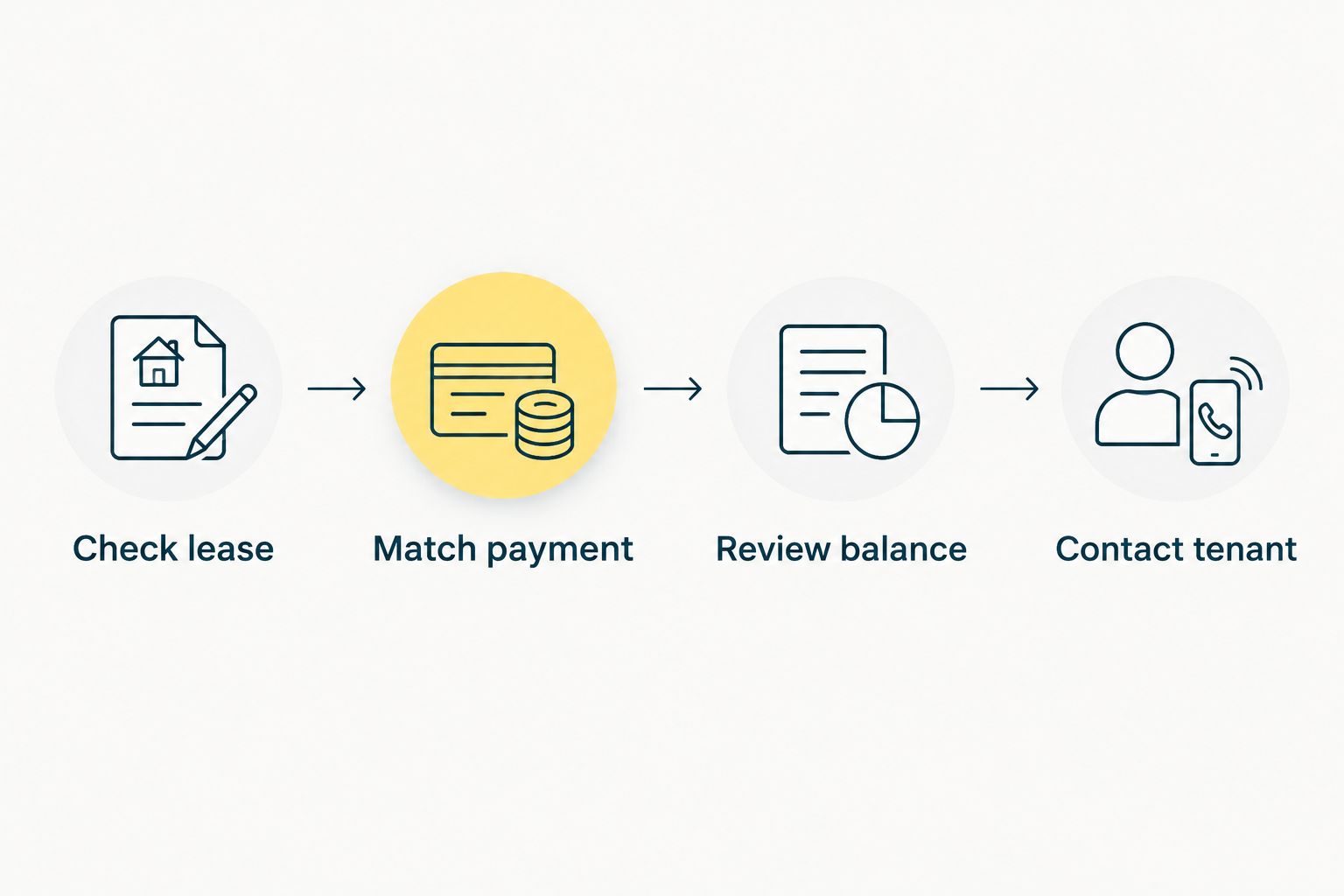
Check the lease before stating what is due.
Look for payments that have not been matched to a unit.
Confirm whether the balance reflects a partial payment.
Keep a record of the message you send.
Test the process with a partial payment
A collection process should make an incomplete payment easier to understand, not hide it. Take a sample scenario from your own lease records and enter a payment that covers only part of the rent due. Check whether your ledger preserves both the original obligation and the amount received. Do this with a test copy of a spreadsheet if you manage records manually.
When assessing software in 2026, ask to see how you would review a tenant balance and trace it back to payment entries. PayRent states that it tracks tenant balances; test whether its workflow gives you the information your recordkeeping needs. Do not assume that a displayed balance answers every bookkeeping or dispute question.
Keep the original amount due visible.
Record the partial payment as its own entry.
Check the resulting balance against your ledger.
Write down what you would need to explain it to the tenant.
Review the experience from a tenant's side
Your records can be tidy while tenants remain unsure how to pay. Before changing methods, draft the instructions a resident will receive. Name the accepted methods, explain where they should find the current payment instructions, and say whom to contact if a payment appears missing. Check those instructions against the process you actually use.
For an online option, walk through the questions a tenant will ask about bank transfers and credit cards. Review current terms rather than guessing what a resident will see. If you keep a manual method, make sure staff know how to identify and record those payments as well. A process tenants understand gives you clearer conversations when something goes wrong.
Explain accepted methods in plain language.
Make the unit identification requirement clear.
Provide a way to raise a missing-payment question.
Check that tenant instructions match your ledger routine.
Check your records before each follow-up cycle
Reserve time to compare the rent roll, received payments, and open balances before you send reminders. With a spreadsheet, filter for balances and inspect the payment entries behind them. With PayRent, review tenant balances and compare the information you need with your own records. Either route depends on someone doing the review.
For 2026, write down who owns that task if more than one person manages the building. The owner or property manager sending a message should know which record supports it. When you find an error, correct the record first and then decide whether the tenant needs an update.
Compare open balances with received payments.
Investigate entries that do not match a unit.
Assign responsibility for checking the records.
Correct errors before sending balance reminders.
Compare rent collection options for a small building
You do not need the same setup as a large property operation to keep accurate records. You do need a method that fits your tenants and gives you a dependable way to reconcile payments. The table compares workable approaches; it does not assume that any method is right for every building.
Option Best for Advantage Key limitation Manual checks and a ledger Owners who prefer a hands-on collection process You control how each receipt enters your records You must receive, match, and enter each payment yourself Bank transfers with a separate ledger Owners who want electronic payments and maintain their own records Payments can be recorded against a unit without handling a check The ledger still needs regular updates and review Credit-card payments with a separate ledger Owners whose tenants need a card option Adds a payment method for those tenants Accepting a card does not, by itself, maintain an accurate rent roll PayRent Independent landlords and property managers with small rental portfolios Supports bank-transfer and credit-card rent collection and tenant-balance tracking You must check current terms and confirm that its records fit your workflow
Choose a manual method if you will reliably maintain the ledger; choose PayRent if you want its stated payment methods and balance tracking together. Neither choice excuses a missed reconciliation. If tenants use different methods, decide how all received payments will appear in the record you rely on for follow-up.
The comparison also points to a useful buying test: start with an actual unit balance you need to explain. Ask where you would find the amount due, the payment received, and the remaining balance under each option. A collection method that cannot support that explanation creates more work when a tenant questions a reminder.
Common mistakes small apartment complex owners make
Treating a payment message as a receipt
A tenant's message that payment was sent is not the same as an entry you have confirmed and matched. Keep the conversation open, but check your records before marking rent paid or sending a balance reminder. This protects both sides from an avoidable disagreement.
Mixing the rent roll with the payment log
If you replace the amount due with the amount received, a partial payment becomes hard to explain. Preserve the lease obligation, record the payment separately, and calculate the balance from those entries. The same rule applies to a spreadsheet and an online platform.
Changing payment methods without changing instructions
A new collection method creates confusion if tenants are still following old instructions. Tell residents which methods you accept and how to raise a payment question. Make sure anyone who helps manage the property gives the same answer.
Assuming software will check every balance for you
PayRent tracks tenant balances, but an owner or property manager still needs to review records before acting on them. Check mismatched payments, partial payments, and the lease terms behind a balance. In 2026, use software to keep the process organized, not to skip the decision about what a tenant actually owes.
FAQ
What is rent collection software for apartment complex owners?
It is software used to receive rent payments and keep payment records for apartment units. Owners should check whether it also supports the balance-tracking and review process their building needs.
Is PayRent suitable for a small apartment complex?
PayRent is suited to independent landlords and property managers managing small rental portfolios. It provides online rent collection by bank transfer or credit card and tracks tenant balances.
Is PayRent better than collecting checks?
PayRent is the better fit when you want its online payment methods and tenant-balance tracking. Checks remain a workable choice if you consistently receive, match, and record them in a ledger.
Can tenants pay rent by bank transfer or credit card with PayRent?
Yes, PayRent supports rent payments by bank transfer and credit card. Check its current payment terms before giving tenants instructions.
How should an owner track a partial rent payment?
Record the full amount due and the partial payment as separate entries. Review the resulting balance against the lease and the received payment before contacting the tenant.
Do I still need a rent ledger if I use online collection?
You still need a clear record of what each unit owes and what it has paid. If you use PayRent, check how its tenant-balance records fit the bookkeeping process you rely on.
What should I check before sending an unpaid-rent reminder?
Check the lease obligation, received payments, and any unmatched or partial payment first. Then state the balance and rental period clearly in your message.
One last thing
Before you replace a 2026 collection process, try to explain one real tenant balance using only the records you keep. If you have to reconstruct it from messages, checks, and memory, fix the recordkeeping routine first. The best rent collection software for apartment complex owners is the option that keeps payments tied to the right unit and leaves you able to explain what remains due.
Written by
David Paxton
Dave is a seasoned real estate investor with over 12 years of experience in the industry. Specializing in single-family residential real estate, David's strategic approach combines market analysis, financial acumen, and a deep understanding of urban development trends to maximize investment returns.